App Clips: Apple’s Secret Weapon for More Conversions in 2026 - Flywheel Studio
App Clips: Apple’s Secret Weapon for More Conversions in 2026

App Clips: Apple’s Secret Weapon for More Conversions in 2026

App Clips: Apple’s Secret Weapon for More Conversions in 2026

By

Marco Restifo Pecorella

Published on:

The App Store is Killing Your Conversions. Here’s the Fix.

Imagine this: a potential customer reaches a moment of high intent. They want to rent your scooter, order your coffee, or try your software. They scan a QR code or tap a link—and the experience breaks.

They land in a mobile browser where performance is inconsistent and the flow feels constrained. Or worse, they’re pushed to install a full app before they’ve even experienced its value.

At that moment, every additional step—download, account creation, payment input—adds friction.

And friction kills intent.

Enter App Clips: A Native, In-The-Moment Experience

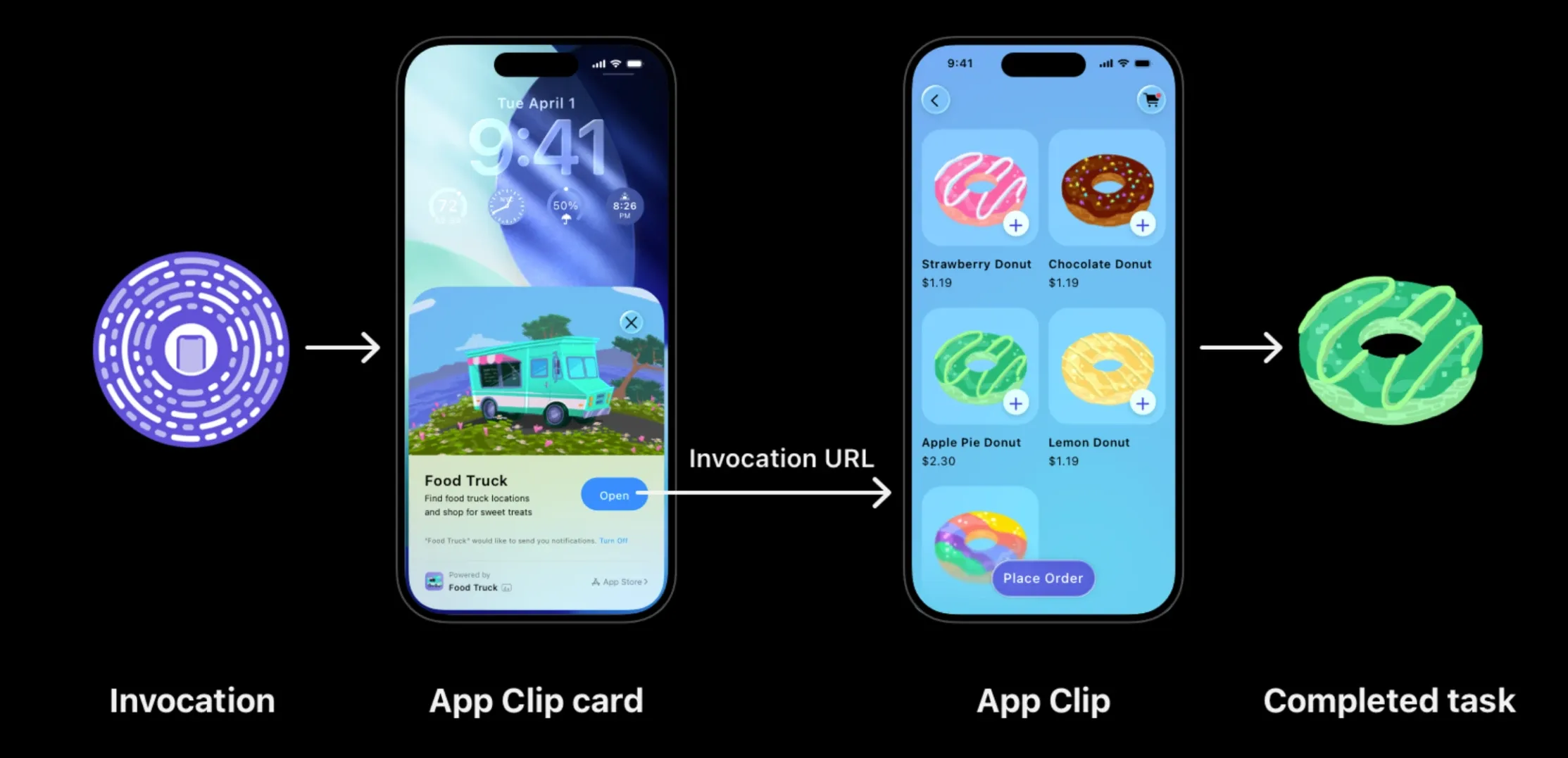
On iOS, App Clips introduce a different model. An App Clip is a lightweight, instantly available part of your app that lets users complete a specific task without installing the full application.
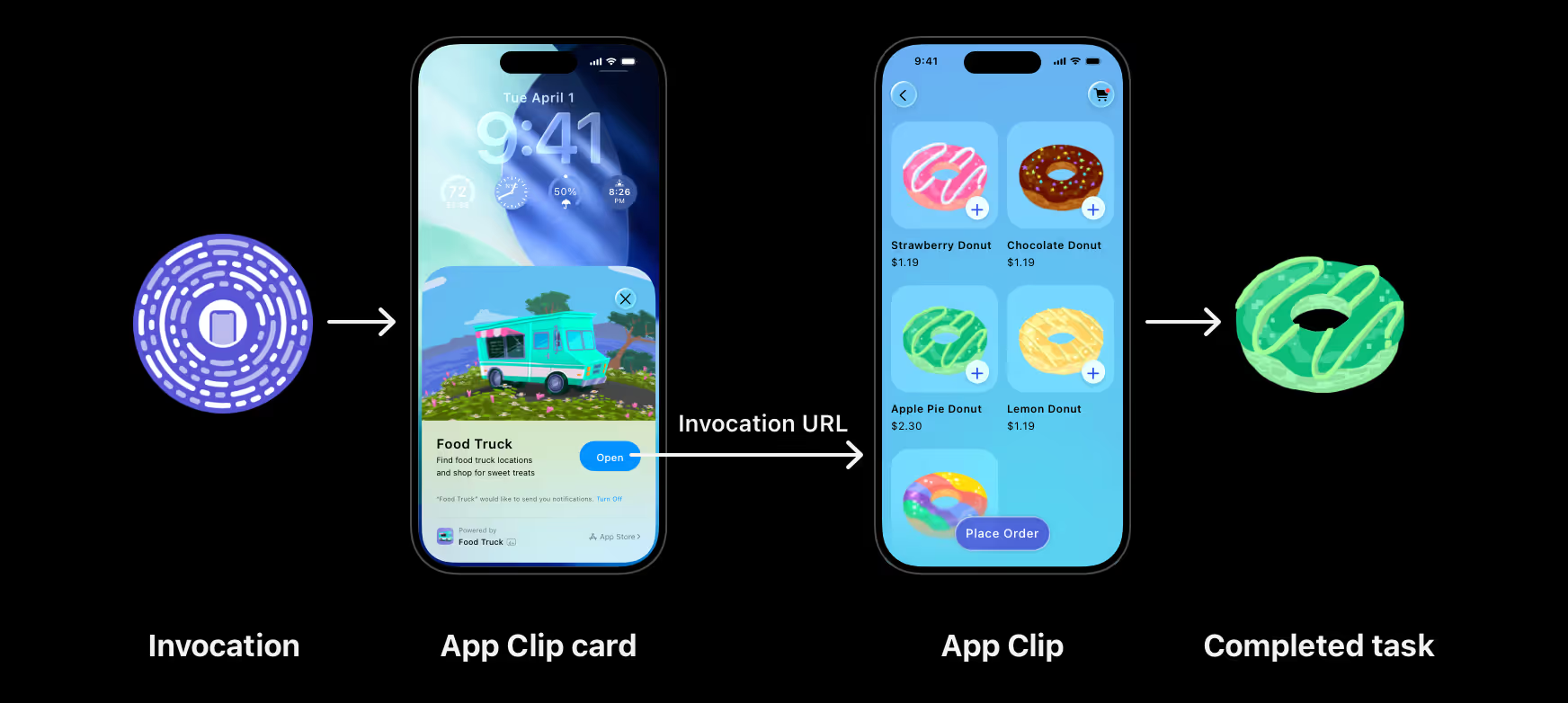
They are not “mini apps” in the generic sense—they are focused entry points into your product, designed to launch fast and solve a single problem: pay, book, unlock, register, or preview.

Instead of routing users through a browser or forcing an install, iOS presents a native interface the moment they engage—whether via QR code, NFC tag, geo position, Maps result, or Safari banner.

This shift matters for three concrete reasons:

1. Native performance at the moment of intent: App Clips run as native iOS code, not inside a browser sandbox. That means faster launch times, smoother interactions, and access to system-level UI patterns. Apple enforces strict constraints on size and scope specifically to guarantee this speed and responsiveness. The result: a focused, high-performance flow optimized for completing one action.

2. Drastically reduced input friction: App Clips integrate directly with system features like Apple Pay and Sign in with Apple, allowing users to authenticate and complete transactions with minimal input. In many cases, the entire flow—from launch to payment—can happen in just a few taps, with no traditional form filling.

3. Value before commitment: An App Clip is designed for in-the-moment use, not long-term retention. It appears when needed and is automatically removed after a period of inactivity. This fundamentally changes the funnel:

  • Users don’t install first and discover value later.

  • They experience value first—and install only if it’s worth it.

In practice, this makes the full app download a post-conversion optimization, not a prerequisite.

A New Conversion Layer: App Clips are not just a distribution feature. They are a system-level mechanism for reducing time-to-value at the exact moment of user intent. They bridge the gap between discovery and action—replacing slow, lossy flows with a fast, native path to conversion.

How It Works: Not a New App, Just a New Target

When founders hear "App Clip," the immediate fear is engineering overhead: Do we have to build and maintain a completely separate application? The short answer is no. Apple designed App Clips to be highly efficient for development teams. An App Clip is not a standalone product; it is built directly within your existing iOS project as a new "Target."

Here is what that means for your product strategy:

1. Shared DNA (Write Once, Use Twice) Because the App Clip lives in the same Xcode project as your main app, it shares the same underlying codebase, assets, and business logic. Your development team simply defines a new entry point that loads a specific piece of the UI. If you update your payment processor or change your brand colors in the main app, the App Clip inherits those updates. It’s an exercise in architectural efficiency, not duplication.

2. The Constraint is the Strategy To ensure App Clips launch instantly—even on weak cellular connections—Apple enforces strict size limitations (traditionally under 15MB for physical invocations like NFC/QR). From an engineering perspective, this requires modular code. But from a product perspective, this constraint is a superpower. It forces ruthless prioritization. You cannot pack your App Clip with marketing bloat, onboarding tutorials, or deep menus. It forces your team to distill the product down to its purest, most valuable action.

3. Cross-Platform Compatible (Yes, it works with Flutter) You don’t need a 100% native Swift codebase to leverage this iOS-exclusive feature. Modern cross-platform frameworks like Flutter fully support App Clip integration. By configuring a specific App Clip target in iOS and pointing it to a lightweight Flutter entry point, teams can maintain a unified cross-platform codebase while still offering premium, native-feeling App Clip experiences exclusively for their Apple users.

4. A Unified Release Cycle You don’t submit an App Clip to the App Store separately. It is bundled, reviewed, and shipped as part of your main app’s payload. When a user eventually decides to download the full app, iOS simply unlocks the rest of the code that was sitting behind the scenes, ensuring a seamless transition and preserving any data or login states established during the App Clip session.

The Trigger: Where Intent Meets Action

An App Clip doesn't sit on a home screen waiting to be found. It is "invoked" exactly when and where a user needs it. For a founder, choosing the right trigger is the most important part of the conversion strategy.

1. Safari & Web Links This is the "Browser Killer." If a user is on your mobile website, a Smart Banner appears and with one tap, they transition from a slow, inconsistent web view to a fluid, native App Clip experience. It ensures the first impression of your product isn't limited by the constraints of a browser.

2. Apple Maps For businesses with physical locations, the App Clip can be integrated directly into your Maps Place Card. A user searching for "Coffee" or "Gyms nearby" can order their drink or book a session directly from the map results—without ever visiting your website or the App Store.

3. NFC Tags The ultimate "tap-to-interact" experience. By placing NFC tags on physical products, tables, or signage, users simply tap their iPhone against the tag. This is ideal for instant utility: unlocking a rental bike, checking into a venue, or pulling up a digital menu at a restaurant.

4. QR Codes The most universal physical trigger. Whether printed on a product box, a receipt, or a flyer, a quick scan launches the App Clip instantly. Apple even provides custom-designed App Clip Codes—circular, distinct visual codes that signal to users that a premium, secure experience is waiting behind the scan.

5. Location-Based Suggestions Through integration with Siri and location services, iOS can surface your App Clip as a suggestion when it detects the user is at a specific place. This places your product in front of the user at the exact physical moment they are most likely to need it.

How Flywheel Bridges the Gap

At Flywheel, we don't just see App Clips as a feature; we see them as the ultimate lead-generation tool for 2026. We specialize in identifying the highest-value "moment of intent" in your customer journey and engineering a frictionless path through it. Whether it's replacing a slow mobile web checkout with a 3-second Apple Pay flow or creating an interactive product demo that launches from an Instagram link, we help you scale by removing every barrier between your user and your product.

The result? Higher conversion rates, lower customer acquisition costs, and a "magic" first impression that makes your brand stand out.

Ready to turn your "lossy" web flows into native conversion engines? Flywheel is ready to help you build the frictionless future of your product.


The App Store is Killing Your Conversions. Here’s the Fix.

Imagine this: a potential customer reaches a moment of high intent. They want to rent your scooter, order your coffee, or try your software. They scan a QR code or tap a link—and the experience breaks.

They land in a mobile browser where performance is inconsistent and the flow feels constrained. Or worse, they’re pushed to install a full app before they’ve even experienced its value.

At that moment, every additional step—download, account creation, payment input—adds friction.

And friction kills intent.

Enter App Clips: A Native, In-The-Moment Experience

On iOS, App Clips introduce a different model. An App Clip is a lightweight, instantly available part of your app that lets users complete a specific task without installing the full application.

They are not “mini apps” in the generic sense—they are focused entry points into your product, designed to launch fast and solve a single problem: pay, book, unlock, register, or preview.

Instead of routing users through a browser or forcing an install, iOS presents a native interface the moment they engage—whether via QR code, NFC tag, geo position, Maps result, or Safari banner.

This shift matters for three concrete reasons:

1. Native performance at the moment of intent: App Clips run as native iOS code, not inside a browser sandbox. That means faster launch times, smoother interactions, and access to system-level UI patterns. Apple enforces strict constraints on size and scope specifically to guarantee this speed and responsiveness. The result: a focused, high-performance flow optimized for completing one action.

2. Drastically reduced input friction: App Clips integrate directly with system features like Apple Pay and Sign in with Apple, allowing users to authenticate and complete transactions with minimal input. In many cases, the entire flow—from launch to payment—can happen in just a few taps, with no traditional form filling.

3. Value before commitment: An App Clip is designed for in-the-moment use, not long-term retention. It appears when needed and is automatically removed after a period of inactivity. This fundamentally changes the funnel:

  • Users don’t install first and discover value later.

  • They experience value first—and install only if it’s worth it.

In practice, this makes the full app download a post-conversion optimization, not a prerequisite.

A New Conversion Layer: App Clips are not just a distribution feature. They are a system-level mechanism for reducing time-to-value at the exact moment of user intent. They bridge the gap between discovery and action—replacing slow, lossy flows with a fast, native path to conversion.

How It Works: Not a New App, Just a New Target

When founders hear "App Clip," the immediate fear is engineering overhead: Do we have to build and maintain a completely separate application? The short answer is no. Apple designed App Clips to be highly efficient for development teams. An App Clip is not a standalone product; it is built directly within your existing iOS project as a new "Target."

Here is what that means for your product strategy:

1. Shared DNA (Write Once, Use Twice) Because the App Clip lives in the same Xcode project as your main app, it shares the same underlying codebase, assets, and business logic. Your development team simply defines a new entry point that loads a specific piece of the UI. If you update your payment processor or change your brand colors in the main app, the App Clip inherits those updates. It’s an exercise in architectural efficiency, not duplication.

2. The Constraint is the Strategy To ensure App Clips launch instantly—even on weak cellular connections—Apple enforces strict size limitations (traditionally under 15MB for physical invocations like NFC/QR). From an engineering perspective, this requires modular code. But from a product perspective, this constraint is a superpower. It forces ruthless prioritization. You cannot pack your App Clip with marketing bloat, onboarding tutorials, or deep menus. It forces your team to distill the product down to its purest, most valuable action.

3. Cross-Platform Compatible (Yes, it works with Flutter) You don’t need a 100% native Swift codebase to leverage this iOS-exclusive feature. Modern cross-platform frameworks like Flutter fully support App Clip integration. By configuring a specific App Clip target in iOS and pointing it to a lightweight Flutter entry point, teams can maintain a unified cross-platform codebase while still offering premium, native-feeling App Clip experiences exclusively for their Apple users.

4. A Unified Release Cycle You don’t submit an App Clip to the App Store separately. It is bundled, reviewed, and shipped as part of your main app’s payload. When a user eventually decides to download the full app, iOS simply unlocks the rest of the code that was sitting behind the scenes, ensuring a seamless transition and preserving any data or login states established during the App Clip session.

The Trigger: Where Intent Meets Action

An App Clip doesn't sit on a home screen waiting to be found. It is "invoked" exactly when and where a user needs it. For a founder, choosing the right trigger is the most important part of the conversion strategy.

1. Safari & Web Links This is the "Browser Killer." If a user is on your mobile website, a Smart Banner appears and with one tap, they transition from a slow, inconsistent web view to a fluid, native App Clip experience. It ensures the first impression of your product isn't limited by the constraints of a browser.

2. Apple Maps For businesses with physical locations, the App Clip can be integrated directly into your Maps Place Card. A user searching for "Coffee" or "Gyms nearby" can order their drink or book a session directly from the map results—without ever visiting your website or the App Store.

3. NFC Tags The ultimate "tap-to-interact" experience. By placing NFC tags on physical products, tables, or signage, users simply tap their iPhone against the tag. This is ideal for instant utility: unlocking a rental bike, checking into a venue, or pulling up a digital menu at a restaurant.

4. QR Codes The most universal physical trigger. Whether printed on a product box, a receipt, or a flyer, a quick scan launches the App Clip instantly. Apple even provides custom-designed App Clip Codes—circular, distinct visual codes that signal to users that a premium, secure experience is waiting behind the scan.

5. Location-Based Suggestions Through integration with Siri and location services, iOS can surface your App Clip as a suggestion when it detects the user is at a specific place. This places your product in front of the user at the exact physical moment they are most likely to need it.

How Flywheel Bridges the Gap

At Flywheel, we don't just see App Clips as a feature; we see them as the ultimate lead-generation tool for 2026. We specialize in identifying the highest-value "moment of intent" in your customer journey and engineering a frictionless path through it. Whether it's replacing a slow mobile web checkout with a 3-second Apple Pay flow or creating an interactive product demo that launches from an Instagram link, we help you scale by removing every barrier between your user and your product.

The result? Higher conversion rates, lower customer acquisition costs, and a "magic" first impression that makes your brand stand out.

Ready to turn your "lossy" web flows into native conversion engines? Flywheel is ready to help you build the frictionless future of your product.


Related Articles

Book an introductory call

We'd love to hear about what you're working on…

© 2026 Flywheel

Book an introductory call

We'd love to hear about what you're working on…

Book an introductory call

We'd love to hear about what you're working on…

© 2026 Flywheel

Book an introductory call

We'd love to hear about what you're working on…

© 2026 Flywheel